Laces Data Platform v9.0#
Release date: July 2, 2021
Since the previous release the following changes have been implemented.
Publication of non-RDF data#
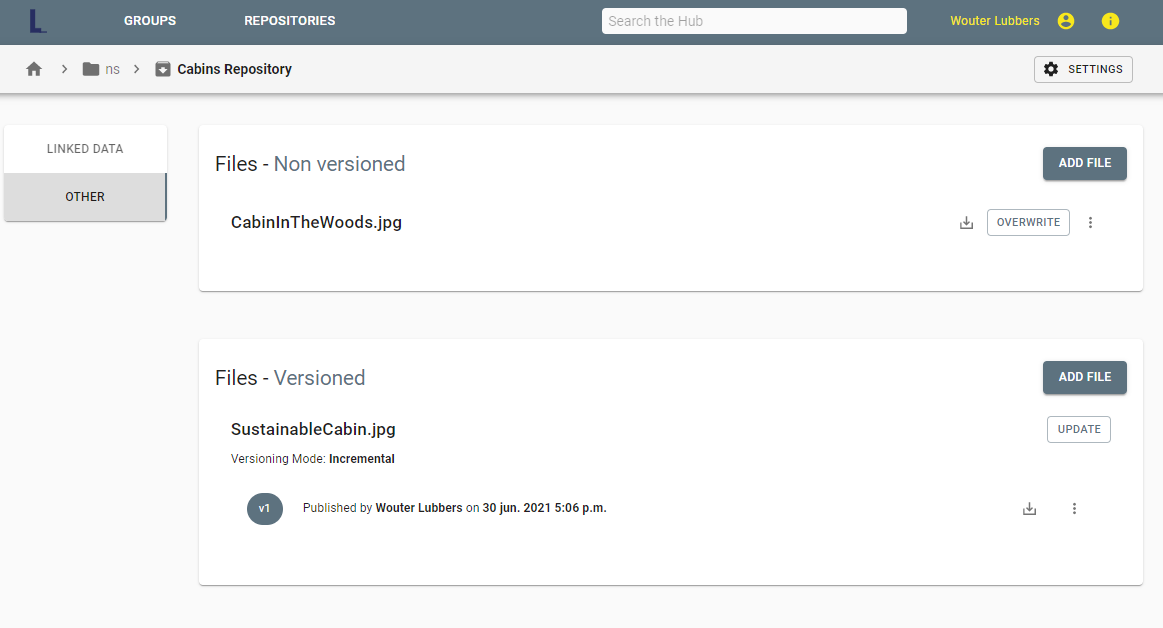
Users can now use Laces Data Platform to upload non-RDF data. For this purpose, repositories have been split up into two parts: Linked Data and Other. The Linked Data section contains all RDF publications, while Other can contain other types of files. Analogous to RDF files, these can be either versioned or non-versioned. Creating, updating and deleting non-RDF files can also be done both from the Laces Data Platform UI or by using the APIs.
Public groups and repositories#
For public groups or repositories, viewer rights can no longer be assigned explicitly. Setting a group or repository to public already implies that everyone is allowed to view it, so this option was redundant.
Invalid RDF files#
Uploading invalid RDF files will now lead to a proper error message, which will point the user to the first error within the supplied RDF file.
Deleting publications#
Next to creating and updating publications, the UI now also supports deletion of publications. To delete a publication or a specific version, navigate to the appropriate repository and click on the three dots on the very right of the publication or version.
Adding members#
The process of adding members to your group or repository has changed slightly. Instead of a drop-down with all available users, it is now mandatory to fill in the email address of the user. While this slightly increases the effort to add new members, it stops users from being able to access the full list of registered Laces Data Platform users.
Approved applications#
The approved applications page took quite a while to load in previous versions. With this release, the loading time has been reduced significantly.
Creating groups or repositories#
After creation of a group or repository, the user is now taken directly to the settings page. In this way, you can continue right away to set up the group or repository by adding members.
More information#
In the top-right corner, an extra 'i' icon has been added. Behind this menu option, you can find the Laces Data Platform documentation (Help), the Laces website (https://www.laceshub.com) and our LinkedIn page with showcases of the Laces suite!